
Agentic and Multimodal AI: Empowering the New Supply Chain
1: Driving a New Era of Intelligence and Autonomy 2: Multimodality: Designing for Multiple Input and Output Channels 3: Mobile AI Experience: Context Switching with Ease

1: Driving a New Era of Intelligence and Autonomy
For decades, many supply chain management initiatives have emphasized incremental improvements in efficiency and cost reduction. However, todayʼs market complexities, such as global disruptions and evolving consumer behavior—require a more far-reaching and strategic response. At Blue Yonder, weʼve observed that Agentic AI (proactive, autonomous systems) and multimodal AI (capable of working with text, images, voice, and more) can dramatically boost visibility, resilience, and responsiveness across operations.
For UX/UI designers, these AI technologies open new possibilities—and new challenges—for interface design, user flows, and inclusive, user-centric solutions. Here’s an overview of our approach, highlighting design best practices and accessibility considerations, that guide us in creating intuitive, empowering AI-driven experiences.
Agentic Approach: A Designers Lens
At Blue Yonder, we imagine future supply chains and their associated products as:
Pervasive & Robust
Agentic & Collaborative
Adaptive & Predictive
Intelligent & Agile
Conversational & Personalized
These pillars aren’t just marketing terms; they directly influence how designers craft, test, and iterate on UIs for AI-enabled tools.
Pervasive and Robust
Continuous visibility into critical information helps keep teams aligned. Clear, concise insights reduce confusion, build user confidence, and enable quick choices in a fast-moving supply chain.
Here are some of the features we’ve developed to support the end user’s productivity and success.
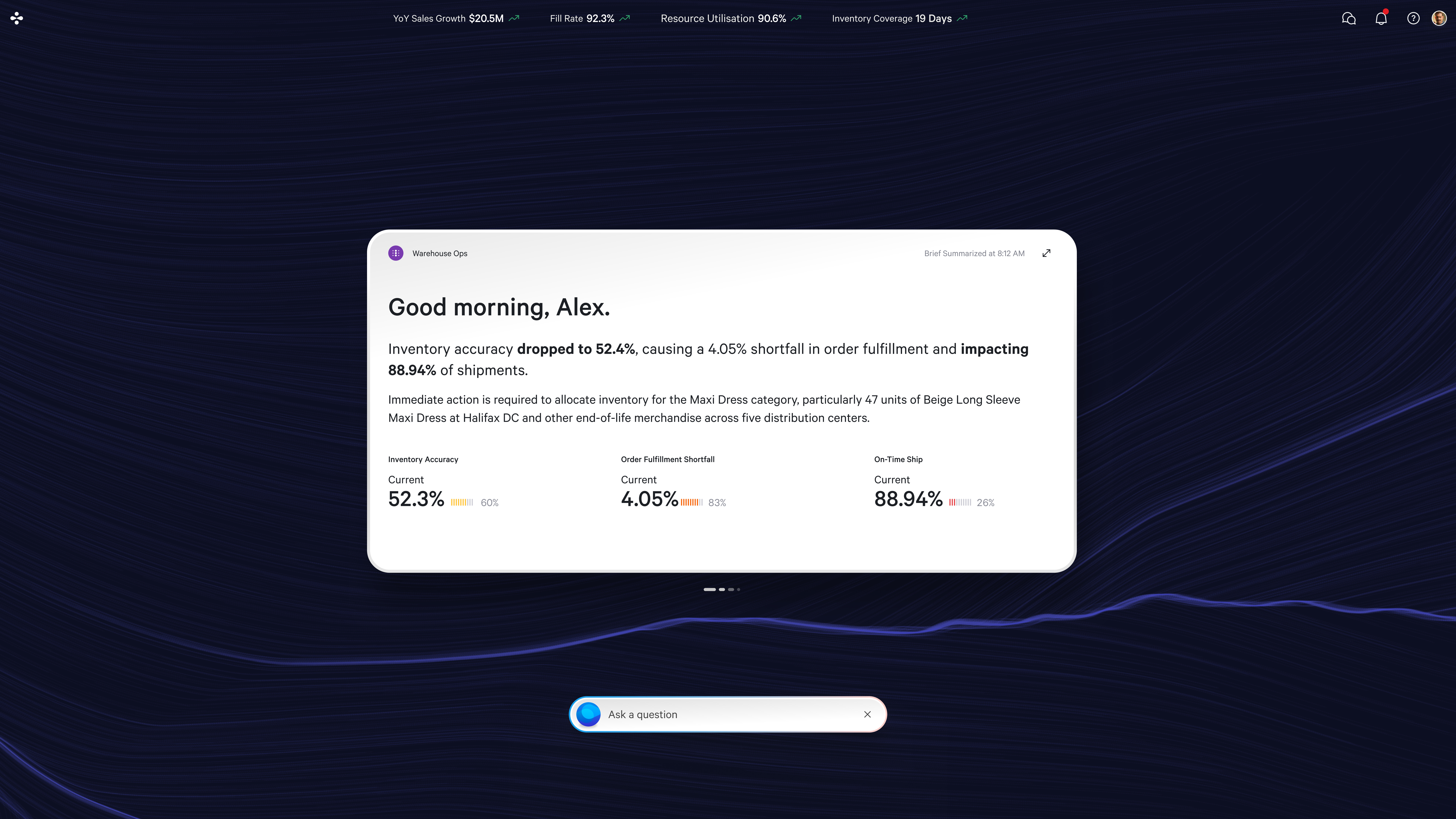
1. Objective Bar
A persistent bar at the top of the interface surfaces critical KPIs and alerts.
Our early prototypes showed that providing trend explanations significantly cut down on user confusion. We then refined the UI based on feedback from warehouse managers who tested scenarios using real data.
Below you can see the objective bar showing KPIs for a warehouse manager

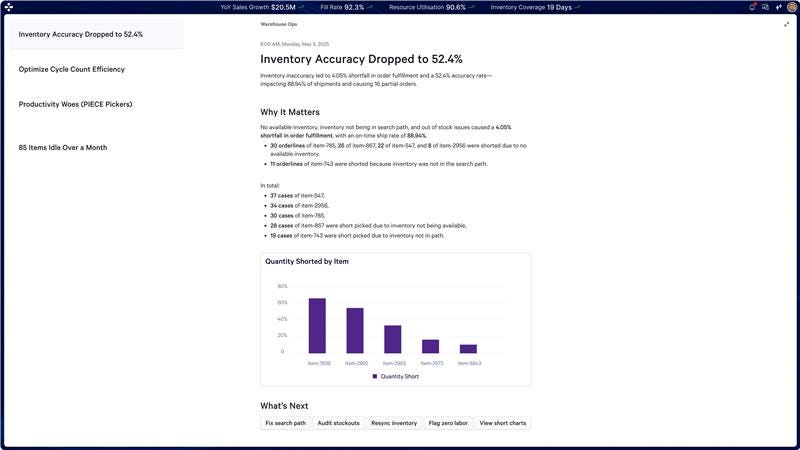
2. Briefing
A prominent summary of key updates that have occurred since the userʼs last session, tailored to their role.
This role-based summary helps users focus on pressing issues and quickly get assistance from a crew of AI agents.
💡Why It Matters
For Designers: Sets the expectation that critical data is always accessible and easy to digest, reducing cognitive overload.
For Stakeholders: Increases user trust by providing transparent, real-time metrics that align with key business goals.
For End Users: Helps them make fast, informed decisions and quickly detect potential disruptions in busy supply chain contexts.
Agentic and Collaborative
When human teams and AI agents coordinate smoothly, each can focus on what they do best. By using open design principles—like modular UIs and transparent reasoning—we create an environment in which AI reinforces human expertise rather than overshadowing it.
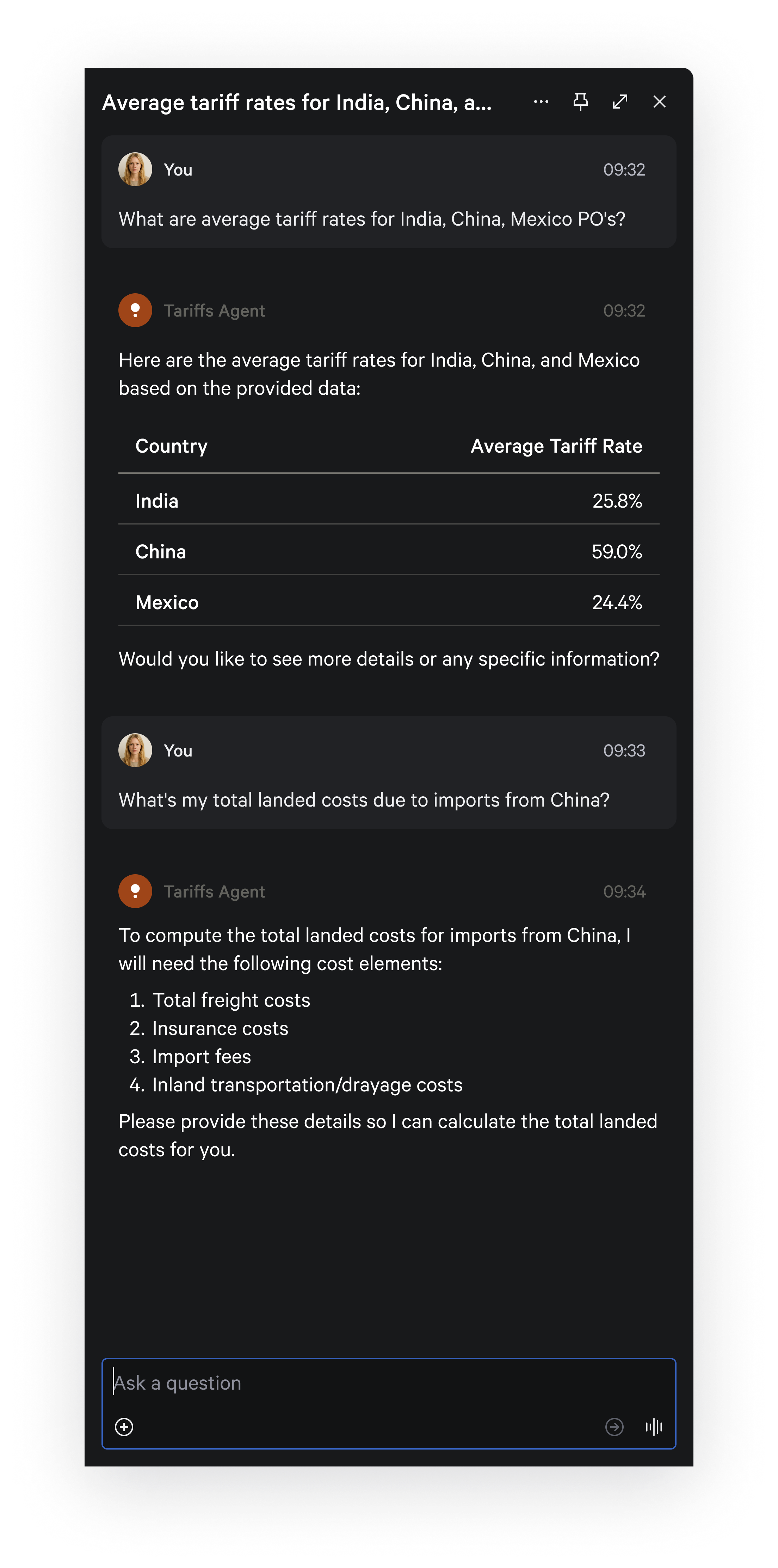
AI Crew of Agents
Each agent automates a specific task (e.g., demand forecasting or disruption management), freeing up users to handle more strategic work.
Collaboration Features
These agents work alongside real human colleagues. At any point, users can check which tasks are automated, which need manual input, and validate how the AI arrived at its decisions. Blue Yonder offers a clear way to review an AIʼs reasoning process, keeping users in control.
💡Why It Matters
For Designers: Challenges them to build transparent, flexible interfaces that clearly explain AI responsibilities.
For Stakeholders: Shows how AI can amplify—not replace—human expertise, driving stronger trust and higher adoption.
For End Users: Provides clarity on which tasks are automated and why, leading to less confusion and more confidence in AI-led actions.
Adaptive and Predictive
Flexibility is non-negotiable in modern enterprise solutions. By anticipating immediate changes and long-term trends, adaptive systems deliver relevant, real-time insights—helping businesses stay nimble even with unpredictable conditions.
Contextual Recommendations
These capabilities continuously adjust to each userʼs context, providing on-the-spot intelligence. For instance, during promotion planning or order fulfillment, the AI might suggest updates on competitor activity, market trends, or forecast anomalies.
When serving a global user base, the system can localize not only language but also cultural norms, date formats, and compliance info.
Feedback Loops
The system collects feedback—like thumbs up/down or brief surveys—on prediction accuracy. The AI then adjusts its model accordingly, and designers pinpoint which UI elements might need fine-tuning.
💡Why It Matters
For Designers: Encourages building dynamic UIs that respond to user behavior and market shifts.
For Stakeholders: Increases ROI by letting the platform quickly pivot to address disruptions or seize new opportunities.
For End Users: Minimizes irrelevant notifications and offers timely insights, making them feel supported by the system.
Intelligent and Agile
With ever-changing global disruptions and constantly shifting customer needs, intelligence and agility are crucial. Thoughtful design turns large data sets into crystal-clear, actionable insights, allowing users to adapt with ease.
Key Benefits:
Disruption Management: Helps users quickly reacts to natural disasters, geopolitical events, and market volatility.
Customer-Centricity: Improves delivery times, product availability, and overall service levels.
Sustainability: Promotes eco-friendly practices and meets regulatory requirements.
Cost Savings: Reduces delays, waste, and resource mismatches through automation and predictive analytics.
💡Why It Matters
For Designers: Emphasizes clarity in data visualization, enabling quick user decisions.
For Stakeholders: Ties an agile interface to broader business resilience—speedier responses and fewer costly mistakes.
For End Users: Delivers proactive alerts and solutions while still giving them the final say.
Conversational and Personalized
Building experiences around user preferences brings AI closer to natural human interaction. Conversational interfaces that adapt to personal styles simplify decision-making and foster a sense of ownership and trust.
Conversational UI
Users specify goals (e.g., “Reduce shipping times in Region X by 20%ˮ), and the system suggests next steps or handles them automatically.
Agents remember user-specific formats (like currency or units) and communication styles (concise vs. detailed).
💡Why It Matters
For Designers: Shifts from just presenting data to creating genuine dialogues, leading to more intuitive user flows.
For Stakeholders: Personalized, conversational features typically boost user satisfaction and engagement.
For End Users: Feels natural and more akin to talking with a knowledgeable coworker than operating a software tool.
2: Multimodality: Designing for Multiple Input and Output Channels
Modern AI solutions can use text, voice, images, video, and even gestures to communicate. This multimodal approach improves accessibility and offers more intuitive interactions, removing language barriers and catering to diverse user needs.
For UX designers, supporting different inputs means creating interfaces that incorporate text fields, voice commands, and emerging technologies (like AR or gesture control) without sacrificing clarity or usability.
Text & Voice Interfaces
Offer clear labels and placeholders for text input. For voice commands, include real-time transcription for clarity and inclusivity.
Video-Driven Interfaces (Coming Soon)
Our GenAI design team is exploring video-driven interactions that mimic face-to- face collaboration.
Design Consideration: Video-based AI should recognize cues like expressions or gestures and always provide a Pause or Mute button for user comfort.
User-Customized AI Avatars
Users can tweak an AI avatarʼs look, voice, or language style.
Accessibility Tip: For hearing-impaired users, include captions or sign- language overlays that can be switched on easily.
💡Why It Matters
For Designers: Encourages them to think beyond one input method, ensuring inclusivity across various devices and user abilities.
For Stakeholders: Stands out in a crowded market as forward- thinking and user-focused.
For End-Users: Lets them choose how they interact with AI, whether through touch, voice, or text, increasing comfort and accessibility.
3: Mobile AI Experience: Context Switching with Ease
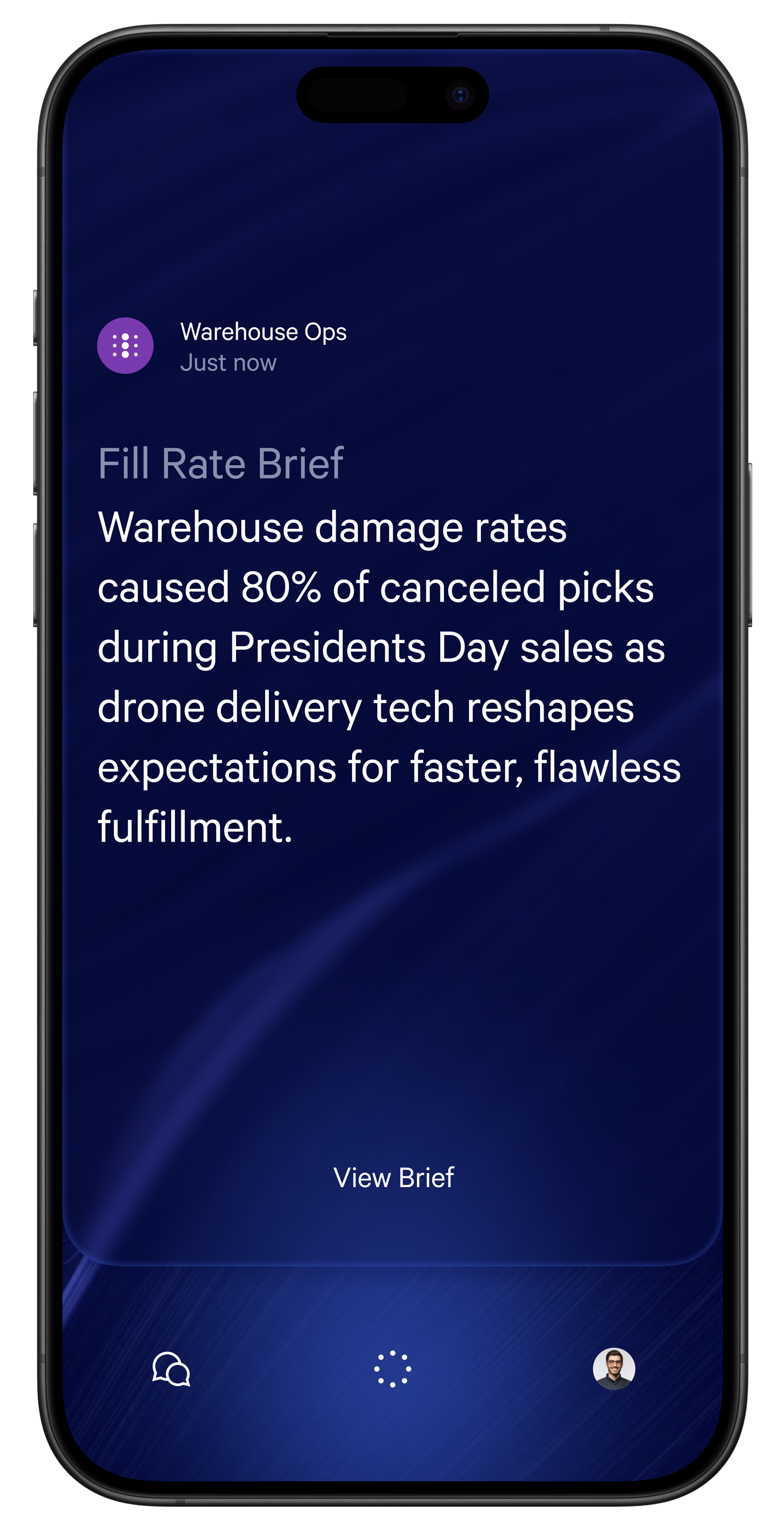
In many roles, work doesn’t stop at the desk. A mobile experience that’s consistent with its desktop counterpart ensures that critical insights and actions are always at users fingertips— no matter where they are.
The app shares the same Brief as the desktop interface, allowing seamless context switching.
If a user needs deeper analysis, they can switch to the desktop UI and pick up exactly where they left off, thanks to a persistent session token
💡Why It Matters
For Designers: Reinforces the value of consistent UX patterns across platforms, so users don’t have to relearn anything.
For Stakeholders: Boosts adoption by empowering decision-makers and frontline staff to be productive anywhere.
For End Users: Offers a convenient, streamlined way to stay informed and act on the go.
Conclusion
As AI continues to grow in scope, designers need to adopt an agentic mindset that respects user autonomy, while also leveraging multimodal solutions and cross-platform strategies. That’s exactly what weʼre aiming for at Blue Yonder: building reliable, user-focused AI systems that bring tangible improvements to both businesses and end-users.
Success ultimately depends on staying human-centric—recognizing that AI can greatly enhance human abilities, but it falls to designers to shape these capabilities into experiences that are frictionless, socially responsible, and empowering.
 | A guest post by
|